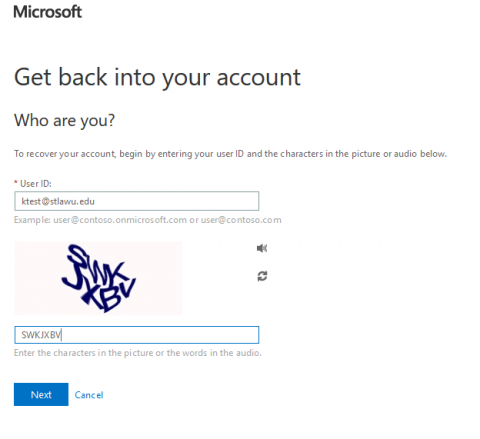
In the "User ID" field, enter your St. Lawrence email address.
Fill out the Capcha.
Click Next.
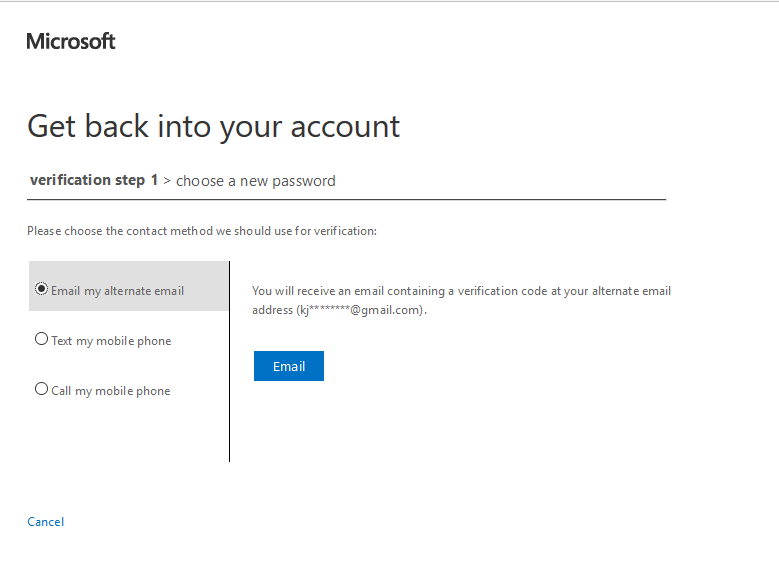
Choose whether you'd like to have the security code sent via a call or text to your personal cell phone, or emailed to your secondary email.
If your cell phone or personal email are not listed, please visit: "Registering Password Reset Information"
Click Email/Text/Call.
The code will be momentarily sent either to your phone or your secondary email. Enter the security code in the box to the right.
Enter a new password of your choosing in the "New password" field. The password must follow the guidelines listed below.
Re-type your new password into the "Confirm new password" field.
Click Next.
Upon entering and confirming a password that meets the requirements, a notification will be sent to both your St. Lawrence and alternate e-mail address. You'll then be able to use this password to access all St. Lawrence network resources.
Password Guidelines
Remember that a new password must meet the guidelines:
Must be minimum of 16 characters (Minimum of 16 characters takes effect on 1/5/2023)
Cannot exceed maximum length of 128 characters
Cannot contain your network user name or parts of your full name that exceed two consecutive characters
Cannot be the same as a previously used Password.
Cannot include any of the following characters: ; : ' " , <. > / ?
Must contain characters from at least three of the following four categories...