Skip to main site navigation Skip to main content
Return to the St. Lawrence University Homepage St. Lawrence University Crest and Logo

Search St. Lawrence

  • Academics
    • Majors and Minors
    • Pre-Professional and Dual-Degree Programs
    • Choosing a Major
    • First-Year Program
    • Sophomore Success Initiative
    • Study Abroad
    • Center for the Environment
    • Research
    • Academic Support
    • Library
    • Meet Our Faculty
    • Academic Calendar
  • Admissions & Aid
    • Visit Us
    • Request Information
    • Applying to St. Lawrence
    • Financial Aid & Scholarships
    • Tuition and Fees
    • Connect With Our Students
    • Admissions Counselors
    • Information for High School Counselors
  • Student Life
    • Explore Our Campus
    • Discover the North Country
    • Get Involved
    • SLU Thrives
    • Housing
    • Dining
    • Traditions and Special Events
    • Resources for International Students
    • Health, Well-Being & Safety
  • Athletics & Recreation
    • Intercollegiate Athletics
    • Intramural and Club Sports
    • Fitness
    • Outdoor Recreation
    • Athletic Facilities
  • Careers & Outcomes
    • No. 1 Alumni Network
    • Our Career Commitment
    • Planning Your Career
    • Internships
    • Outcomes
    • Signature Career Programs
  • About
    • Fast Facts
    • Mission and History
    • President Kathryn A. Morris
    • Diversity and Inclusion
    • Sustainability
    • St. Lawrence in the Community
    • Regional Accommodations
    • Maps, Directions, and Parking
    • Contact Us
Request Information Apply Visit Us
  • Resources For
    • Current Students
    • Faculty and Staff
    • Alumni
    • Parents & Families
  • Make a Gift
  • Directory

Self Service View Pay Advices

  • Information Technology
  • How-To
  • Self-Service (Colleague)

Overview

This article explains how to view pay advices in Self Service. 

Instructions

  • Navigate to https://colss-prod.ec.stlawu.edu/Student and login using your St. Lawrence Username and Password
  • Click on the Employee button:
Screenshot of the Employee Button on Self Service
  • Click on the "Earning Statements" button

Screenshot of Earning Statements Button on Self Service
  • Select the year in the drop down menu and then click on the Pay Advice you would like to view
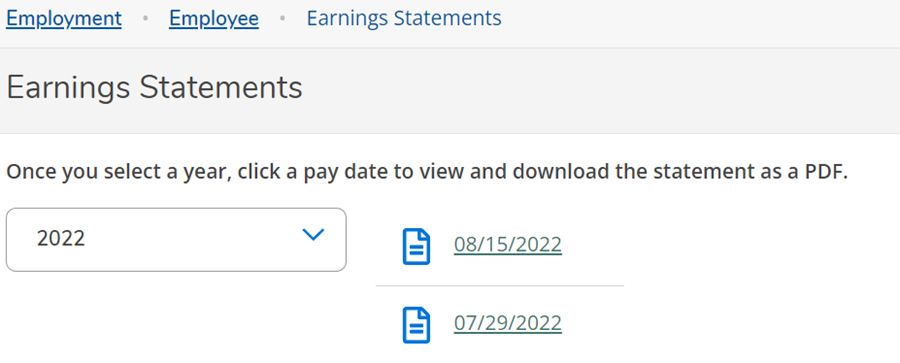
Screenshot of the listed Earnings Statements on Self Service


Return to the St. Lawrence University Homepage St. Lawrence University Crest and Logo

23 Romoda Dr.
Canton, NY 13617

  • 800-285-1856
  • Contact Us
  • Maps, Directions, and Parking
  • Events
  • Faculty Directory
  • Department Directory
  • News
  • Libraries
  • Bookstore
  • NCPR
  • Canaras Conference Center

Helpful Links

  • Title IX
  • Consumer Information
  • Well-Being Resources
  • Employment
Brewer Bookstore logo in white.

The Brewer Bookstore carries SLU apparel, books, gifts, and other items.

Shop the Bookstore
  • Follow us on Facebook Facebook
  • Subscribe to us on YouTube Youtube
  • Follow us on Twitter X (Twitter)
  • Connect with us on LinkedIn LinkedIn
  • Follow us on Instagram Instagram
  • TikTok
© 2025 St. Lawrence University PrivacyAccessibilityCopyright Login